
Coolmuster Android Assistant1.5.0 - Download
You'll be able to download in few seconds.
Publisher Description
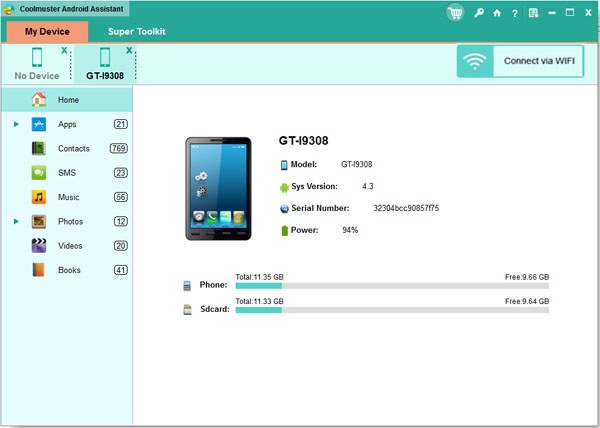
Key Features:
1. How to Backup Android? 1 Click is Enough!
Coolmuster Android Assistant enables you to export videos, photos, music, contacts, SMS, apps, etc. from Android phone or tablet to computer, so that you can free up your Android space for new files. Additionally, you can restore your Android phone from the selected or all backed-up files with one click. A wide range of Android brands are supported by this Android managing tool, including HTC, Samsung, Motorola, Sony, ZTE, LG, HUAWEI, Dell and many more. 100% Safe application. Performs READ-ONLY operations to avoid causing any damage to the Android data and your computer.
2. Want A Perfect Contacts and SMS Assistant? Here It Is!
Just end your life of group text messaging or adding contacts one by one manually on your Android phone with Coolmuster Android Assistant. Exprience a new texting way here and better manage your contacts on computer. This Android managing software enables you to send and reply SMS on computer and perform group texting at once to save time greatly. What's more, you are allowed to add new contacts, delete useless contacts, edit exsiting contacts and unduplicate contacts on computer conveniently.
3. Are You An App and Media Fancier? You Can Not Miss It!
If you are an app enthusiast and media fancier, Coolmuster Android Assistant will be your must-have tool because it features with all powerful functions that make you fully enjoy entertainment on the go. Instantly download and install your favorite apps on your computer and export them to your Android SD card with a click. You can backup all or seleted apps from your Android to computer or uninstall useless apps quickly from computer. Want to enjoy media files anytime and anywhere? Android Assistant helps you transfer your wanted music, photos and videos from computer to Android phone without any hassle.
About Coolmuster Android Assistant
This Office Suites & Tools program is available in English. It was last updated on 29 September, 2026. Coolmuster Android Assistant is compatible with the following operating systems: Other, Windows.
The company that develops Coolmuster Android Assistant is Coolmuster Studio. The latest version released by its developer is 1.5.0.
The download we have available for Coolmuster Android Assistant has a file size of 5.2 MB. Just click the green Download button above to start the downloading process. The program is listed on our website since 2013-11-07 and was downloaded 0 times. We have already checked if the download link is safe, however for your own protection we recommend that you scan the downloaded software with your antivirus. Your antivirus may detect the Coolmuster Android Assistant as malware if the download link is broken.
How to install Coolmuster Android Assistant on your Windows device:
- Click on the Download button on our website. This will start the download from the website of the developer.
- Once the Coolmuster Android Assistant is downloaded click on it to start the setup process (assuming you are on a desktop computer).
- When the installation is finished you should be able to see and run the program.
Program Details
System requirements
Download information
Pricing
Version History
version 1.5.0
posted on 2013-11-07
Better Manage Android Data in One Place on Windows Computer;
Disclaimer
External Download
We do not host Coolmuster Android Assistant on our servers. We did not scan it for viruses, adware, spyware or other type of malware. This app is hosted by the software publisher and passed their terms and conditions to be listed there. We recommend caution when installing it.
The external download link for Coolmuster Android Assistant is provided to you by apps112.com without any warranties, representations or guarantees of any kind, so access it at your own risk.
If you have questions regarding this particular app contact the publisher directly. For questions about the functionalities of apps112.com contact us.
